 I thought that I would take a moment to explain how to use Google Talk with iChat. I really like the ease of use and simplicity of iChat, and love that it integrates so well with Google Talk. I have a lot mre friends with PCs that are using gTalk, then Mac friends that are using AIM. So here it is.
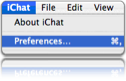
1. Open iChat and Select Preferences/
2. Add a new account by clicking on the + button in the Accounts pane.
3. From the drop down menu, click on Jabber Account.
4. In the Jabber ID field put your email address. example@gmail.com
5. Password: Your password.
5. In the server field, put talk.google.com
6. Then click add.
7. Make sure that in the server settings that talk.google.com is being used, and that all options are selected.
That is it, you are now ready to start chatting it up. If you need somebody to chat it up with, don’t hesitate to add me, at whyisjake at gmail dot com.


Leave a Reply